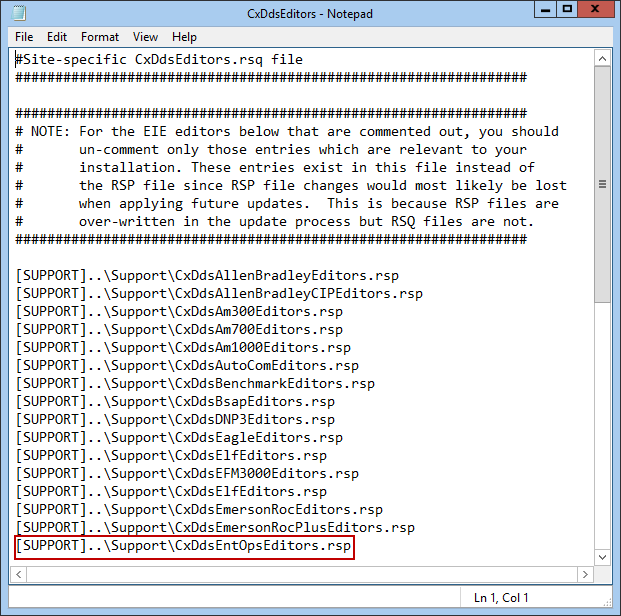
[SUPPORT]..\SUPPORT\CxDdsEntOpsEditors.rsp |
Installing the Enterprise Operations EIE requires installation of a driver file and an editor file, and inclusion in CygNet Explorer version management.
The driver file (UisEntOpsDeviceDriver.dll) is the Enterprise Operations Device Driver module, used by the UIS. It is stored in the CygNet\Support folder on the host server. The driver file must be registered on the CygNet host in order for the UIS to load any Enterprise Operations devices.
Note: Optionally, the 64-bit driver file (UisEntOpsDeviceDriver64.dll) is stored in the CygNet\Support64 folder on the host server.
The editor file (CxDdsEntOpsEditors.dll) is the Enterprise Operations Device Editor module, used by CygNet Explorer. It must be loaded into the APPS and included in version management for CygNet Explorer.
The response list file (CxDdsEntOpsEditors.rsp) must also be loaded into the APPS to facilitate proper installation and version management.
Note: In order for version management to function properly, the procedures described in Version Management must be followed.
See the CygNet System Requirements document for installation prerequisites.
To Install the Enterprise Operations (EntOps) EIE on a CygNet Service Host
Step 1: Install the Driver File
Step 2: Install the Editor File
The files involved in version management are the .rsp file (CxDdsEntOpsEditors.rsp) and the .rsq file (CxDdsEntOpsEditors.rsq). The.rsp file lists all required files for the Enterprise Operations EIE editor.
[SUPPORT]..\SUPPORT\CxDdsEntOpsEditors.rsp |
Step 3: Perform Version Management for CygNet Explorer

|
|
|

